배경 설명
평소에 영어로 프롬프트를 작성하면 모델이 더 좋은 성능을 보일 것이라고 생각하였고 겸사겸사 영어에 더 익숙해지기 위해서 되도록 Claude Code, Codex 등을 사용할 때는 영어로 prompt를 작성하였습니다. 그러나 이 경우에 부족한 영어 실력 때문에 의미나 뉘앙스가 잘못 전달되는 경우가 종종 있었습니다.
처음에는 prompt rewriter를 만들어서 기존 프롬프트를 자동으로 교정된 버전으로 대체하는 hook을 만들려고 했습니다. 하지만 Claude Code의 hook 시스템은 기존 프롬프트를 수정하는 것이 아니라 추가적인 프롬프트만 제공할 수 있었습니다. 또한 추가적인 프롬프트 제공도 완벽하지 않다는 이슈들이 있어 실제로 적용하는 데 어려움이 있었습니다. issue link
그러다 jiun.dev의 글에서 영어 공부용으로 hook을 활용하는 아이디어를 얻었고, 이를 참고해서 영어 공부용으로 수정해보기로 했습니다.
구현
저는 모델 성능 저하를 최소화하고 싶었기 때문에 메인 프롬프트에 context가 주입되지 않는 것이 이상적이었습니다. 하지만 필요한 hook인 UserPromptSubmit은 유저에게만 메시지를 보내는 기능을 지원하지 않았습니다.
그럼에도 context 낭비를 최소화하기 위해 별도의 Claude Code 프로세스를 실행해서 structured output 형식으로 결과를 출력하도록 구현했습니다. 이렇게 하면 hook의 출력이 context에 들어가긴 하지만 메인 context의 낭비를 최소화 할 수 있습니다.
이때 별도의 Claude Code 프로세스를 non-interactive 모드로 실행하더라도 hook이 주입되기 때문에 환경변수를 통해 아주 간단한 LOCK을 구현하였습니다.
disableAllHooks 옵션을 통해 hook을 비활성화 할 수 있으나 이 경우에 structured output이 필요로하는 SDK hook이 동작하지 않아 structured output을 받을 수 없습니다.
다만 이러한 방식들로 구현할 경우 ctrl-o 를 통해 토글할 수 있는 history 창에서만 출력을 볼 수 있고 resume 시에 보이지 않는다는 단점이 있습니다.
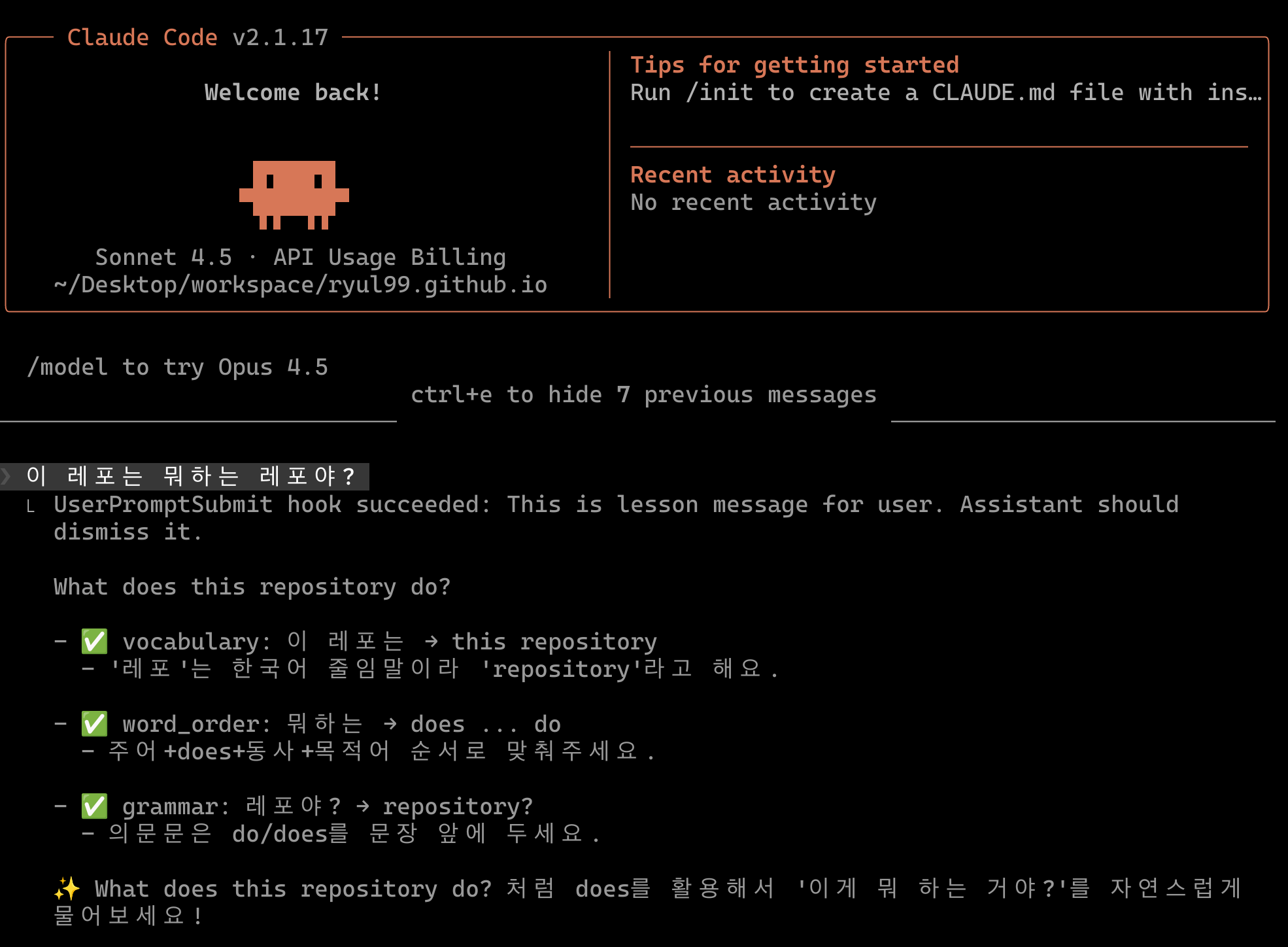 |
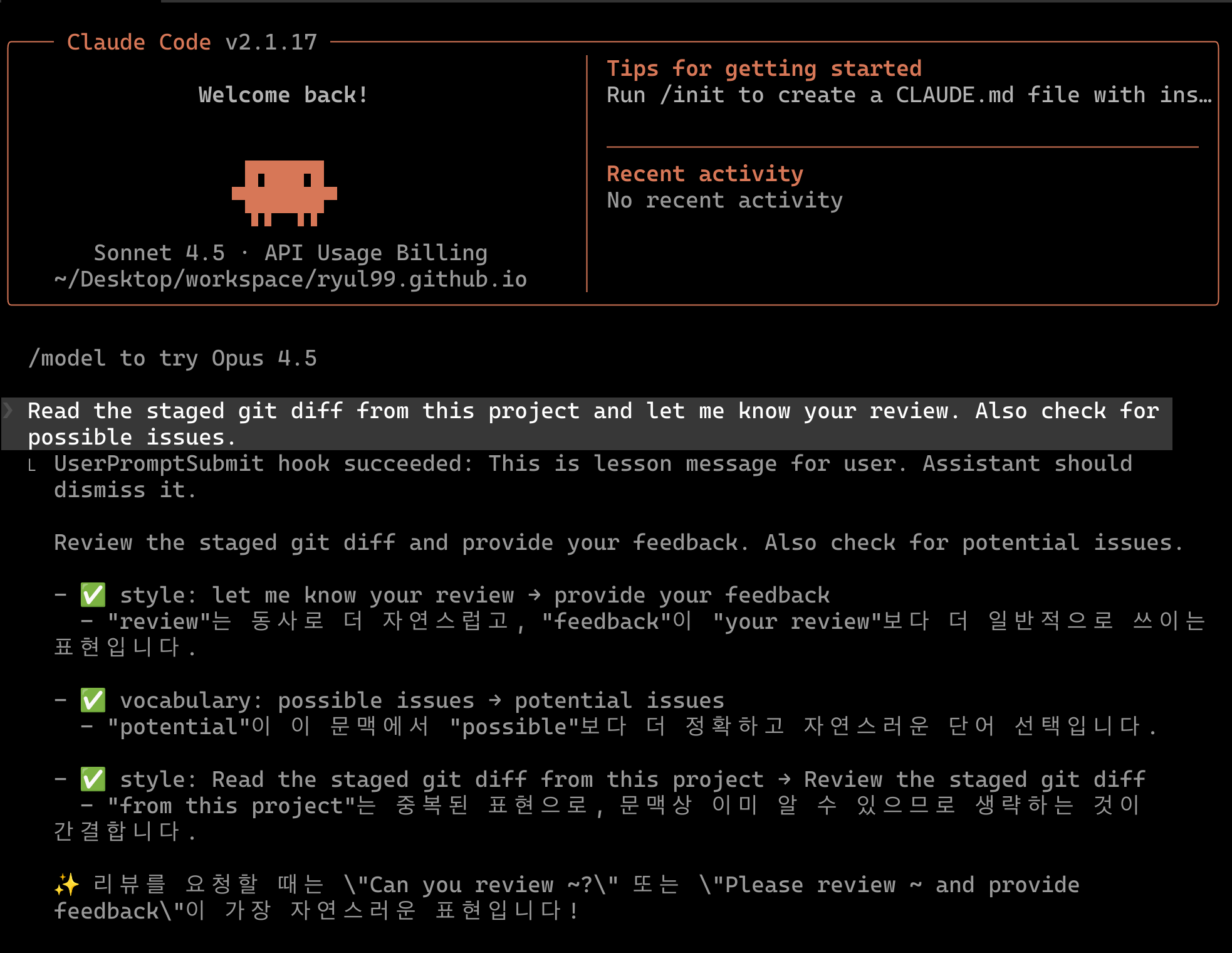 |
설정 방법
1. 스크립트 설치
아래 명령어를 실행하면 스크립트 파일이 자동으로 생성되고 실행 권한이 설정됩니다.
cat > ~/.claude/english-lecturer.sh << 'EOF'
#!/bin/bash
# acknowledge: https://github.com/crescent-stdio for prompt

if [[ -n "$REWRITER_LOCK" ]]; then
    exit 0
fi

INPUT_PROMPT="$(cat | jq '.prompt')"
TARGET_LANGUAGE="Korean"

JSON_SCHEMA='
{
    "type": "object",
    "properties": {
        "enhanced_prompt": {
            "type": "string",
            "description": "The improved prompt preserving original meaning"
        },
        "has_corrections": {
            "type": "boolean",
            "description": "Whether the original prompt had any issues to improve"
        },
        "corrections": {
            "type": "array",
            "items": {
                "type": "object",
                "properties": {
                    "original": { "type": "string" },
                    "suggestion": { "type": "string" },
                    "category": {
                        "type": "string",
                        "enum": ["grammar", "vocabulary", "style", "spelling", "word_order"]
                    },
                    "explanation": { "type": "string" }
                },
                "required": ["original", "suggestion", "category", "explanation"]
            },
            "description": "Gentle improvement suggestions, max 3 items"
        },
        "tip": {
            "type": "string",
            "description": "One concise learning tip"
        }
    },
    "required": ["enhanced_prompt", "has_corrections", "corrections", "tip"]
}
'

INPUT_PROMPT="\
You are a supportive, encouraging English coach for a $TARGET_LANGUAGE developer. Analyze the prompt below and return structured JSON.

Rules:
1. enhanced_prompt: Rewrite to be clear, natural, professional English. Preserve the original intent exactly. If the prompt is code-only or already perfect English, return it unchanged.
2. has_corrections: true if you made any meaningful improvements, false if the prompt was already correct or is pure code/commands.
3. corrections: List up to 3 gentle improvement suggestions. Each must have:
   - original: the phrase from the original prompt
   - suggestion: the improved phrase
   - category: one of grammar, vocabulary, style, spelling, word_order
   - explanation: brief explanation in $TARGET_LANGUAGE (1 sentence, max 20 words).
4. tip: One memorable tip in $TARGET_LANGUAGE (1 sentence, max 30 words) about the most useful pattern. If no corrections, share a useful English expression tip.

Focus on patterns $TARGET_LANGUAGE speakers commonly struggle with: articles (a/the), prepositions, singular/plural, tense consistency, word order.

<PROMPT>
$INPUT_PROMPT
</PROMPT>\
"

RESPONSE="$( \
    REWRITER_LOCK=1 claude \
    --model sonnet \
    --output-format json \
    --json-schema "$JSON_SCHEMA" \
    -p "$INPUT_PROMPT"
)"

STRUCTURED_OUTPUT="$(echo "$RESPONSE" | jq -r '.structured_output')"

echo 'This is lesson message for user. Assistant should dismiss it.
'

if [[ -z "$STRUCTURED_OUTPUT" || "$STRUCTURED_OUTPUT" == "null" ]]; then
    OUTPUT_PROMPT="Failed to generate lesson."
    exit 0
fi

ENHANCED="$(echo "$STRUCTURED_OUTPUT" | jq -r '.enhanced_prompt')"
HAS_CORRECTIONS="$(echo "$STRUCTURED_OUTPUT" | jq -r '.has_corrections')"
TIP="$(echo "$STRUCTURED_OUTPUT" | jq -r '.tip')"

OUTPUT_PROMPT="$ENHANCED"

if [[ "$HAS_CORRECTIONS" == "true" ]]; then
    CORRECTIONS_DISPLAY="$(echo "$STRUCTURED_OUTPUT" | jq -r '
        .corrections[] |
        "- ✅ \(.category): \(.original) → \(.suggestion)\n  - \(.explanation)\n"
    ')"
    OUTPUT_PROMPT="$OUTPUT_PROMPT

$CORRECTIONS_DISPLAY"
fi

OUTPUT_PROMPT="$OUTPUT_PROMPT

✨ $TIP"

echo "$OUTPUT_PROMPT"
exit 0
EOF
chmod +x ~/.claude/english-lecturer.sh
2. 설정 파일 수정
~/.claude/settings.json에 다음 내용을 추가합니다.
{
  "hooks": {
    "UserPromptSubmit": [
      {
        "hooks": [
          {
            "type": "command",
            "command": "~/.claude/english-lecturer.sh"
          }
        ]
      }
    ]
  }
}
혹은 아래 명령어를 실행합니다.
jq '.hooks.UserPromptSubmit = ((.hooks.UserPromptSubmit // []) + [{"hooks": [{"type": "command", "command": "~/.claude/english-lecturer.sh"}]}])' ~/.claude/settings.json > /tmp/settings.json && mv /tmp/settings.json ~/.claude/settings.json
3. 커스터마이징
스크립트 내의 다음 변수들을 수정해서 동작을 변경할 수 있습니다.
TARGET_LANGUAGE: 문법 설명의 언어 (기본값: “Korean”)JSON_SCHEMA: Claude로부터 받을 응답의 구조 (프롬프트를 크게 변경하지 않는다면 수정이 필요하지 않습니다)- 사용 모델 (기본값: “sonnet” / haiku의 경우 빠르긴 하나 성능이 떨어졌습니다)
이제 프롬프트를 제출할 때마다 자동으로 교정된 버전과 짧은 문법 설명을 받을 수 있습니다.